Solved!!
Yes, after a long procedure of try and error, I solve the problems.
And yes, in sum it was a problem of path settings. But not so easy for me to figure it out. In the following, I describe the problems and how I fix them.
Same folder not equal same path
If you save all data in one folder it could be the same path for Windows but not for the software. The path must first be set exactly, it is not enough to open the file from the folder.
So take a look at:
In VS_Code
To be sure, that the scripts to be executed find all needed data, go to VS_Code in the exact folder where you’re working. Only seeing them in your workspace is not enough for execution. With executing of “dir” and “cd” ("cd… ") at the terminal, VSC show you in which direction you are and you can go in or out of the folder. (Set the direction)
For the NS EM enviroment (console) the same applies.
Path NS console
And at least it’s the same for NS Prep where you build up the CAD.
Attention
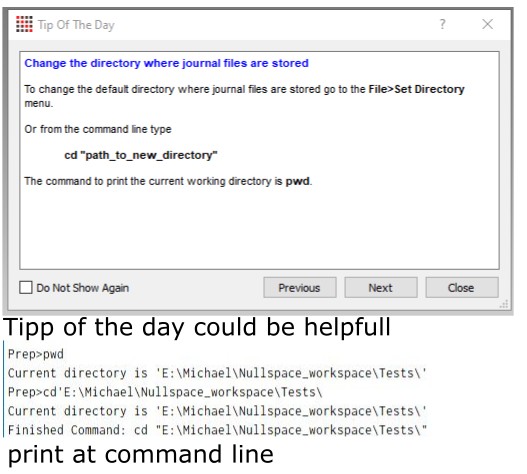
To set the working direction under “File” → “Set Directory” isn’t enough. You need it to save the data at the right direction but for using the command line, you have to check the direction also.
command line console is also important
As before, “dir” and “cd” are also helpful. But be careful, if you only execute “cd” without adding a path, it changes to the main path and gets out of your direction.
At least, some comments or tips:
nsem load material library
If NS prep doesn’t find any materials, you can also add the path instead of only the filename. Then, you can be sure that it will find it.
What else?
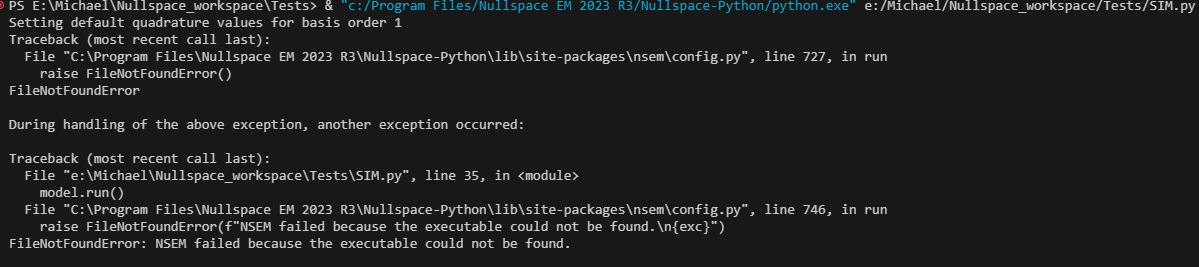
Yes, that isn’t all. I gained some experience with executing the Python simulation and postprocessing files. If I try to execute them from VS_Code it doesn’t work. I get an Error.
The Error
But, if I execute them with the NS EM environment console, it works. The Simulation starts and does what it should be doing. Same for Postprocessing.
At the end, I get the same results as shown in the tutorials. **Happy ** 
What I don’t solve
I tried to find more commands for the command line which could help to fix some problems or make using faster. If you write in NS Prep at the command line “help”, you get a lot of commands, which I don’t know how to use. They also described some commands in the Coreform user guide (Coreform is the basement of NS Prep).
Command Line “Help”
I try to execute the shown examples, I get only errors. What I also see in some pictures like here, is that the command compiler begins with “Cubit>” and not like in NS Prep with “Prep>”. So I’m not sure that NS Prep can use most of the shown commands, because the interpreter doesn’t know them. And most of what is described there you can only use at the original coreform but not in the adapted NS Prep.
This is my current status, which may of course be incorrect. If I solve this over time, I will share it with you.
So far I would like to thank you for your support and hope that I could help others with troubleshooting. If you have any questions, please contact me personally if possible.